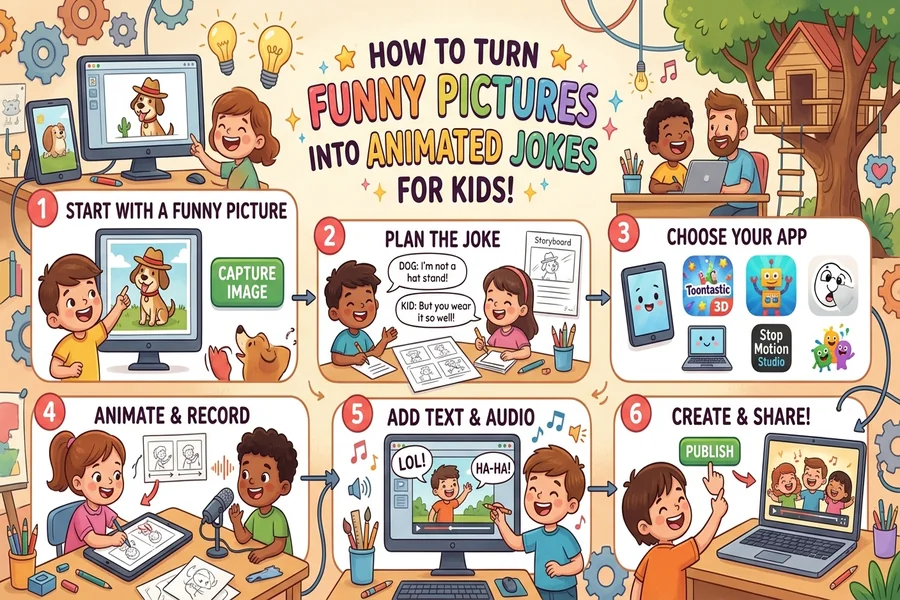
Funny pictures can make kids smile, but adding movement can turn a simple image into a hilarious visual joke. Parents, teachers, and young creators can animate images to bring silly characters, clever puns, and playful scenes to life. The process does not require advanced editing skills or expensive software. With the right picture, a simple joke, and a few animation tricks, anyone can create short, funny clips that entertain children and spark their creativity.
What Makes Animated Picture Jokes So Funny for Kids?
Children enjoy humor that feels simple, surprising, and easy to understand. A picture of a smiling banana might already seem funny. However, when that banana starts dancing or talking, the joke becomes even more entertaining.
Animation adds movement, facial expressions, and timing to an ordinary picture. These elements help children understand the joke and enjoy its playful nature. A surprised expression, a sudden jump, or a silly dance can make a familiar image feel completely different.
Visual jokes also work well because children do not always need long explanations to understand them. A dancing pencil or a laughing potato can create an instant smile. When creators combine these funny scenes with short, clever captions, they produce engaging content that children can enjoy and share with family members.
Websites such as KidzPuns focus on playful word humor, making puns and silly jokes a useful starting point for creating animated picture jokes.
Key Takeaway: Animated picture jokes combine funny visuals, simple movement, and clever words to make humor more engaging and easier for children to enjoy.
How Can You Choose the Right Funny Picture for Animation?
The first step is choosing an image that already contains something amusing. A funny facial expression, an unusual animal pose, or an everyday object with a silly personality can provide a strong starting point.
For example, imagine a picture of a cat sitting at a computer. The scene becomes more humorous when the cat appears to type an important message. You could add the caption, “I’m working on my purr-formance review!”
Children often respond well to familiar animals, colorful objects, and exaggerated expressions. These subjects are easy to recognize, which helps young viewers understand the humor quickly.
What Types of Pictures Work Best?
Consider these picture ideas when planning your animated joke:
- Funny animals: A dancing penguin, a laughing dog, or a confused monkey.
- Talking food: A cheerful pizza, a sleepy potato, or a singing cupcake.
- School objects: A nervous pencil, a bouncing eraser, or a talking backpack.
- Silly characters: A friendly monster wearing glasses or a robot telling jokes.
- Everyday situations: A banana slipping on its own peel or a shoe running away from its owner.
Choose pictures with clear subjects and simple backgrounds. Busy images can distract children from the joke. Bright colors and recognizable expressions usually make the scene easier to follow.
You should also use your own artwork, properly licensed illustrations, or images that you have permission to edit. This helps you avoid copyright problems when sharing your finished animation.
Key Takeaway: Choose colorful, easy-to-understand pictures with funny characters or expressions. A clear visual idea creates a stronger foundation for an animated joke.
How Do You Animate Images Into Funny Jokes Step by Step?
Turning a still picture into an animated joke involves adding simple movement and matching it with a humorous message. You do not need to create a full cartoon. A few seconds of movement can make a picture feel lively and entertaining.
Image animation means adding motion to a still image or its separate elements to create the appearance of movement. This might include blinking eyes, moving mouths, bouncing objects, or changing facial expressions.
Key Takeaway: Image animation brings still pictures to life through movement. Small actions can create funny moments without requiring complex editing.
Step 1: Start With a Simple Joke
Before adding animation, decide what makes the picture funny.
For example, suppose you have a picture of a smiling potato. You might use the joke:
“Why did the potato sit down? Because it was totally mashed!”
This simple question-and-answer format works well for children because the setup creates curiosity before revealing the punchline.
Step 2: Choose an Easy Animation Tool
Several beginner-friendly editing tools offer features that help turn pictures into moving scenes.
Look for features such as:
- Basic motion effects
- Text and caption overlays
- Character movement
- Simple transitions
- Sound effects
- GIF or video export options
Tools that support keyframes can provide extra creative control.
A keyframe marks a specific position or state of an object at a particular point in an animation. For example, one keyframe could show a character standing still, while another shows it jumping upward. The software creates the movement between those positions.
Step 3: Add Small Movements
Start with one or two simple actions rather than animating everything.
For example, make the potato bounce when the joke begins. Then add a surprised expression before revealing the punchline.
Other easy movements include blinking, waving, spinning, stretching, or gently shaking an object.
Step 4: Add the Joke as Text
Place the setup near the beginning of the animation. Reveal the punchline after a short pause.
Use large, readable text and a clean font. Avoid long sentences that children may struggle to read before the animation ends.
Step 5: Add Playful Sound Effects
A small pop, squeak, boring, or cartoon giggle can make an animated joke more entertaining.
Sound effects should support the funny moment rather than overpower it. Keep the volume comfortable, especially when creating content for younger children.
Step 6: Preview and Export
Watch the finished animation from beginning to end. Check whether the text is readable, the movements feel smooth, and the punchline appears at the right moment.
Export the clip as a GIF or short video, depending on where you plan to use it. Remember that GIFs generally do not contain audio, so use a video format when sound is important.
Key Takeaway: To create an animated joke, pick a funny picture, write a short punchline, add simple movement, and reveal the joke with good timing.
How Can You Turn Popular Kids’ Puns Into Animated Scenes?
Puns are especially useful for animated jokes because they connect familiar words with unexpected meanings. A visual scene can make the wordplay easier to understand.
For example, consider the joke, “What do you call a sleeping dinosaur? A dino-snore!”
You could show a friendly dinosaur lying on a pillow. As the character falls asleep, animated letters spelling “Zzz” appear above its head. The punchline then pops onto the screen.
This approach combines the written joke with a visual clue. Children can connect the sound of “dino-snore” with the familiar word “dinosaur.”
Here are a few more ideas:
| Joke | Animation Idea |
| “Why was the math book sad? It had too many problems!” | A math book frowns while numbers float around it. |
| “What do you call a bear with no teeth? A gummy bear!” | A cartoon bear smiles and reveals a gummy candy grin. |
| “Why did the cookie go to the doctor? It felt crummy!” | A cookie drops a few crumbs and makes a worried face. |
| “What do clouds wear under their clothes? Thunderwear!” | A fluffy cloud opens a tiny umbrella as thunder rumbles. |
When you animate images using wordplay, keep the movement connected to the joke. A random spinning effect may look amusing, but a character action that reinforces the punchline makes the humor stronger.
You can also explore different themes, such as animal puns, food jokes, school humor, and silly riddles. These categories give young creators plenty of familiar ideas to experiment with.
Key Takeaway: The best animated puns use visual actions that match the punchline. When the picture helps explain the joke, children can enjoy both the humor and the wordplay.
Why Does Timing Matter in Animated Jokes?
Comedy depends on timing, and animation is no exception. A punchline that appears too early can spoil the surprise. On the other hand, waiting too long may cause young viewers to lose interest.
A simple animated joke often works best with three parts: the setup, a short pause, and the funny reveal.
Imagine a cartoon pencil looking worried. First, the screen displays, “Why was the pencil feeling nervous?” The pencil then trembles slightly. After a brief pause, the punchline appears: “Because it was under too much pressure!”
The movement supports the joke without distracting from it.
How Long Should an Animated Joke Be?
For a quick visual joke, try starting with a clip of about 5 to 12 seconds. This is a creative guideline rather than a strict rule. A longer riddle may need extra time, especially if children are expected to read the words themselves.
A practical sequence could look like this:
- First 2 seconds: Introduce the character and question.
- Next 2 to 3 seconds: Add a funny reaction or short pause.
- Final 3 to 5 seconds: Reveal the punchline and show the character’s response.
Adjust the pace based on the child’s reading level. Young children may need slower text reveals and a longer ending.
Key Takeaway: Good timing makes animated jokes funnier. Show the setup, build a little suspense, and reveal the punchline when the viewer is ready.
How Can You Make Animated Jokes Safe and Age-Appropriate?
Kid-friendly humor should feel playful, kind, and easy to understand. Avoid jokes that embarrass people, encourage dangerous behavior, or rely on frightening images.
Choose cheerful characters, friendly expressions, and lighthearted situations. Humor about talking animals, school supplies, and silly food characters offers plenty of room for creativity without making anyone the target of a mean joke.
Visual comfort also matters. Fast flashing effects can create problems for some viewers. The W3C Web Content Accessibility Guidelines explain why creators should limit flashing content and avoid harmful visual patterns.
You can make animations more accessible by using readable captions, gentle transitions, clear contrast, and sound that does not carry the entire joke.
If children help create or share animations, adults should review the content, check image permissions, and avoid posting personal details. The U.S. Copyright Office’s fair use guidance also helps explain why finding an image online does not automatically give someone permission to reuse it.
Key Takeaway: Safe animated jokes use positive humor, gentle movement, readable text, and properly licensed images. Adult guidance helps keep the creative process suitable for children.
What Creative Activities Can Kids Try With Animated Pictures?
Making animated jokes can become a fun family or classroom activity. Instead of simply watching funny clips, children can help invent characters, write punchlines, and decide how each scene should move.
One activity is a pun challenge. Give children a familiar word, such as “egg,” “star,” or “bee,” and invite them to create a short joke around it. Then ask them to draw a character that matches their idea.
For example, a child might invent a bee preparing for a spelling test and call it a “spelling bee.” The animation could show the bee proudly holding a pencil before buzzing across the screen.
Another idea is a finish-the-joke activity. Show children a funny picture with a question but hide the punchline. Let them suggest answers before revealing the animated ending.
For classroom use, small groups can create storyboards with three frames: beginning, funny action, and punchline. This helps children plan their stories before using editing software.
These activities encourage imagination, communication, and playful experimentation. They also give children a chance to discuss why a joke works and how images can help tell a story.
Key Takeaway: Animated joke activities allow children to practice storytelling, teamwork, and creative thinking while turning simple puns into entertaining visual stories.
Frequently Asked Questions
Can beginners turn funny pictures into animated jokes?
Yes. Beginners can use simple editing tools that offer motion effects, text overlays, and ready-made animations. Start with one picture, one movement, and one short punchline.
Quick Answer: Beginners can create animated jokes with basic editing tools and a few simple effects.
Do you need drawing skills to animate funny pictures?
No. You can work with your own photos, licensed illustrations, or ready-made characters that permit animation. Basic editing skills are enough for simple projects.
Quick Answer: Drawing skills are optional because existing pictures and illustrations can become animated scenes.
What is the easiest way to animate images for kids?
Start with a clear cartoon picture and add a basic movement, such as bouncing or blinking. Then place a short joke on the screen and reveal its punchline after a brief pause.
Quick Answer: The easiest method combines one clear image, one simple movement, and a short joke with good timing.
Can animated jokes help children understand wordplay?
They can provide helpful visual clues. A picture that matches a pun may make its double meaning easier to notice, especially when an adult explains unfamiliar words.
Quick Answer: Animated jokes can support children’s understanding of puns by connecting words with clear visual examples.
Which format is better for animated jokes, GIF or video?
GIF works well for short, silent loops. Video is a better choice when the joke needs sound effects, voice narration, or music.
Quick Answer: Choose GIF for silent visual jokes and video when sound helps deliver the humor.
Conclusion: Bring Funny Pictures to Life With Simple Animation
Turning funny pictures into animated jokes is a creative way to combine humor, imagination, and simple digital skills. The process begins with a playful image and a clever idea. From there, small movements, readable captions, and thoughtful timing can transform an ordinary picture into a memorable joke.
Parents, teachers, and young creators do not need complicated software or professional animation experience to get started. A bouncing banana, a sleepy dinosaur, or a talking schoolbook can provide enough inspiration for a funny animated scene.
The goal is to make children smile while giving them opportunities to experiment with storytelling and wordplay. Start small, keep the humor friendly, and let each picture tell its own silly story.
Key Takeaway: Turning funny pictures into animated jokes works best when creators combine clear visuals, simple motion, age-appropriate puns, and good comic timing. With a little creativity, everyday pictures can become playful stories that entertain children and encourage imagination.